Arch+KDE Plasma(Wayland)環境で120Hzを出力させる
2026/01/17
| 2026/01/17
| 6分 (3,510字)
| 1回
文字サイズ
code.bash
# Monitor:ASTEX AX-ESK55(HDMI)

❯ lspci -nn | grep -E "VGA|3D|Display"
0f:00.0 VGA compatible controller [0300]: Advanced Micro Devices, Inc. [AMD/ATI] Vega 10 XL/XT [Radeon RX Vega 56/64] [1002:687f] (rev c3)現状設定を開いても下記の通りFHD環境でも60Hzまでしか設定に出てこない状況。
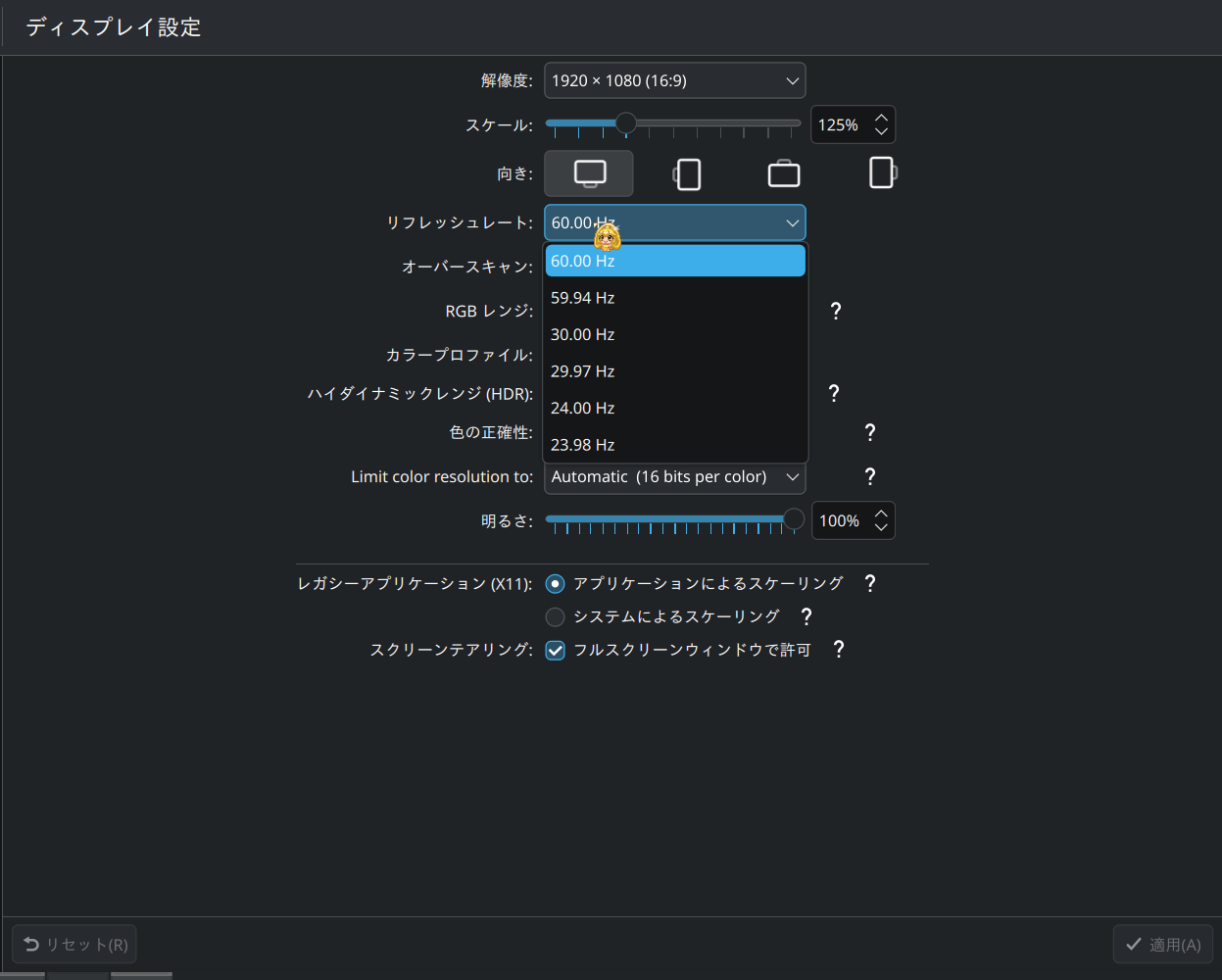
同様の情報があるか簡単に検索するも該当しそうな情報がなかった。
HDMIバージョンも考えてみたが、WIndows環境で直近まで使用を確認していたのと、
自宅環境に置いてあるものは直近すべて入れ替えを行っているため考えにくい。
DisplayPortでの切り分けを考えるものの、ディスプレイ側の入力が非対応のため今回は割愛。
調べていく中で、ArchLinuxの下記記事が一番状況を解決しそうだったため従うことに。
Windows環境でドライバからEDIDを抽出するのがめんどくさそうだったため、4.1項のモード強制を試すことにします。
まずはコネクタを特定します。
code.bash
❯ grep "^connected" /sys/class/drm/*/status
/sys/class/drm/card1-HDMI-A-1/status:connectedcard1-HDMI-A-1というのが特定できたので、ブートローダーの設定を変更します。
私はsystemd-boot環境のため、/boot/loader/entries/yyyy-mm-dd_hh-mm-ss_linux.confを編集します。
中身を下記のように追記して再起動します。
code.diff
# Created by: archinstall
# Created on: 2026-01-11_05-49-33
title   Arch Linux (linux)
linux   /vmlinuz-linux
initrd  /initramfs-linux.img
- options root=PARTUUID=29bbe235-5fd5-495c-a779-89bdf7455ff1 rw rootfstype=ext4
+ options root=PARTUUID=29bbe235-5fd5-495c-a779-89bdf7455ff1 rw rootfstype=ext4 video=HDMI-A-1:1920x1080@120
再起動後、適切に表示されるか設定を確認します。
code.bash
kscreen-doctor -o
Output: 1 HDMI-A-1 73cc794a-2adb-4f27-b885-bdb855f165cf
        enabled
        connected
        priority 1
        HDMI
        replication source:0
        Modes:  1:3840x2160@60.00!  2:4096x2160@60.00  3:4096x2160@59.94  4:4096x2160@50.00  5:4096x2160@30.00  6:4096x2160@29.97  7:4096x2160@25.00  8:4096x2160@24.00  9:4096x2160@23.98  10:3840x2160@60.00  11:3840x2160@59.94  12:3840x2160@50.00  13:3840x2160@30.00  14:3840x2160@29.97  15:3840x2160@25.00  16:3840x2160@24.00  17:3840x2160@23.98  18:2560x1440@59.95  19:1920x1080@120.00*  20:1920x1080@119.88  21:1920x1080@100.00  22:1920x1080@60.00  23:1920x1080@59.94  24:1920x1080@50.00  25:1920x1080@30.00  26:1920x1080@29.97  27:1920x1080@25.00  28:1920x1080@24.00  29:1920x1080@23.98  30:1600x900@60.00  31:1280x1024@60.02  32:1152x864@59.97  33:1280x720@60.00  34:1280x720@59.94  35:1280x720@50.00  36:1024x768@60.00  37:800x600@60.32  38:720x576@50.00  39:720x480@60.00  40:720x480@60.00  41:720x480@59.94  42:720x480@59.94  43:640x480@60.00  44:640x480@59.94  45:640x480@59.94  46:720x400@70.08  47:1600x1200@59.87  48:2560x1600@59.99  49:1920x1200@59.88  50:1280x800@59.81  51:3200x1800@59.96  52:2880x1620@59.96  53:1368x768@59.88
        Geometry: 0,0 1536x864
        Scale: 1.25
        Rotation: 1
        Overscan: 0
        Vrr: incapable
        RgbRange: Automatic
        HDR: disabled
        Wide Color Gamut: disabled
        ICC profile: none
        Color profile source: sRGB
        Color power preference: prefer accuracy
        Brightness control: supported, set to 100% and dimming to 100%
        Color resolution: automatic (16), range: [8; 16] bits per color
        Allow EDR: unsupported
        Sharpness control: unsupported
120Hzの表記が確認出来たため、設定画面も確認してみます。
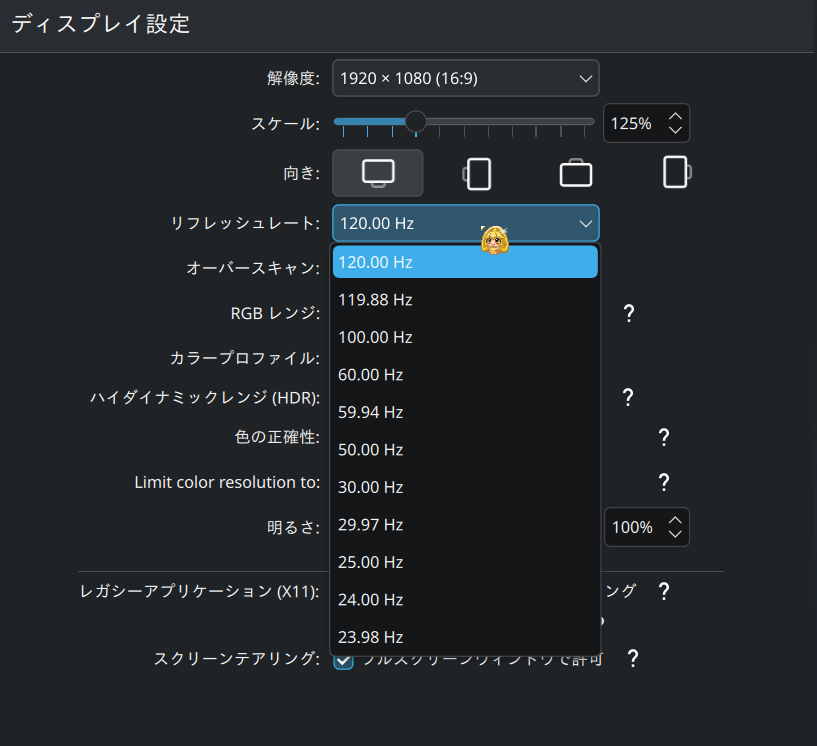
問題なく項目が表示されているため、このまま適用して問題なく120Hzでディスプレイ側でも表示を確認することが出来ました。
現時点では再起動やスリープ復帰後、Steamのフルスクリーンゲーム時などでも問題なく動作しています。